RTC
Usage Instructions
-
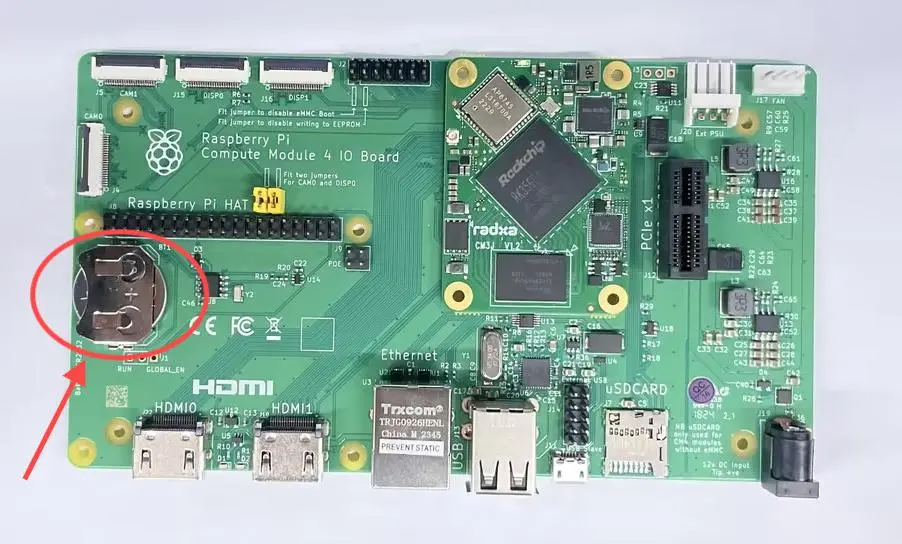
Install the battery
-
As shown in the image, install the RTC battery onto the Raspberry Pi Compute Module 4 IO Board.
-
-
Power on to start
-
Check the device
- RTC is typically mapped to a device file in Linux. You can check the
/dev/rtc*or/sys/class/rtc/directory to verify if the RTC device has been recognized and loaded.
- RTC is typically mapped to a device file in Linux. You can check the
-
Read the current RTC time
-
Use the
hwclockcommand to read the current RTC time. Execute the following command in the terminal:sudo hwclock -r
-
-
Write the time
-
If you need to set the RTC time, you can use the
hwclockcommand and provide a new time value with the--setoption. For example, to set it to the current system time, use:sudo hwclock --set --date="2024-07-09 15:43:15"
-
-
Continuous testing
- Disconnect the Raspberry Pi Compute Module 4 IO Board's network connection and power, and after ten minutes or longer, read the RTC time again. The time should be based on the previously set time, with the elapsed time added.