MobileNet
Environment Setup
info
Follow RKNN Installation to set up the environment.
Follow RKNN Model Zoo to download the example files.
Model Download
Download the ONNX model file.
X64 Linux PC
cd rknn_model_zoo/examples/mobilenet/model/
bash download_model.sh
Model Conversion
Select the target platform.
- rk3588
- rk356x
- rk3576
X64 Linux PC
export TARGET_PLATFORM=rk3588
X64 Linux PC
export TARGET_PLATFORM=rk356x
X64 Linux PC
export TARGET_PLATFORM=rk3576
Convert the ONNX model to an RKNN model.
tip
After running the conversion script, you can see the model output.
X64 Linux PC
cd ../python/
python mobilenet.py --model ../model/mobilenetv2-12.onnx --target ${TARGET_PLATFORM}
Model output:
-----TOP 5-----
[494] score=0.98 class="n03017168 chime, bell, gong"
[653] score=0.01 class="n03764736 milk can"
[469] score=0.00 class="n02939185 caldron, cauldron"
[505] score=0.00 class="n03063689 coffeepot"
[463] score=0.00 class="n02909870 bucket, pail"
C API
Build the Example
Go to the rknn_model_zoo directory and run build-linux.sh to build.
X64 Linux PC
cd ../../..
bash build-linux.sh -t ${TARGET_PLATFORM} -a aarch64 -d mobilenet
Sync Files to the Device
Copy the built demo directory under the install folder to the device.
X64 Linux PC
cd install/${TARGET_PLATFORM}_linux_aarch64/
scp -r rknn_mobilenet_demo/ user@your_device_ip:target_directory
Run the Example
Export the runtime libraries to the environment variable.
Device
cd rknn_mobilenet_demo/
export LD_LIBRARY_PATH=./lib
Run the example.
Device
./rknn_mobilenet_demo ./model/mobilenet_v2.rknn ./model/bell.jpg
$ ./rknn_mobilenet_demo ./model/mobilenet_v2.rknn ./model/bell.jpg
num_lines=1001
model input num: 1, output num: 1
input tensors:
  index=0, name=input, n_dims=4, dims=[1, 224, 224, 3], n_elems=150528, size=150528, fmt=NHWC, type=INT8, qnt_type=AFFINE, zp=-14, scale=0.018658
output tensors:
  index=0, name=output, n_dims=2, dims=[1, 1000, 0, 0], n_elems=1000, size=1000, fmt=UNDEFINED, type=INT8, qnt_type=AFFINE, zp=-55, scale=0.141923
model is NHWC input fmt
model input height=224, width=224, channel=3
origin size=500x333 crop size=496x320
input image: 500 x 333, subsampling: 4:4:4, colorspace: YCbCr, orientation: 1
src width is not 4/16-aligned, convert image use cpu
finish
rknn_run
[494] score=0.993227 class=n03017168 chime, bell, gong
[469] score=0.002560 class=n02939185 caldron, cauldron
[747] score=0.000466 class=n04023962 punching bag, punch bag, punching ball, punchball
[792] score=0.000466 class=n04208210 shovel
[618] score=0.000405 class=n03633091 ladle
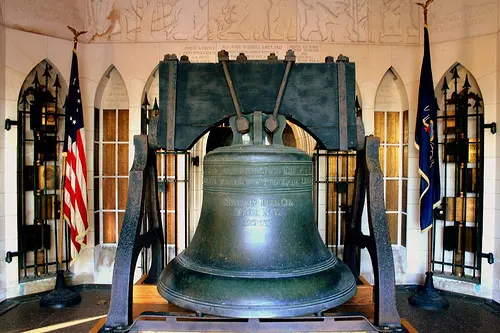
This output indicates the model classifies the image as bell, gong.
Test Image
Python API
This example does not provide a standalone Python API script; you can implement one yourself.