RTC Battery
The onboard RTC battery connector on Radxa NX4 Development Kit provides a stable clock source, ensuring the system can keep accurate time even after power is removed.
Connector specifications
- Connector type: 2-Pin 1.25 mm Connector
- Battery type: CR2032
- Battery voltage: 3.3V
Hardware connection
When connecting an RTC battery to Radxa NX4 Development Kit, pay attention to the polarity and operating voltage to avoid damaging Radxa NX4 Development Kit.
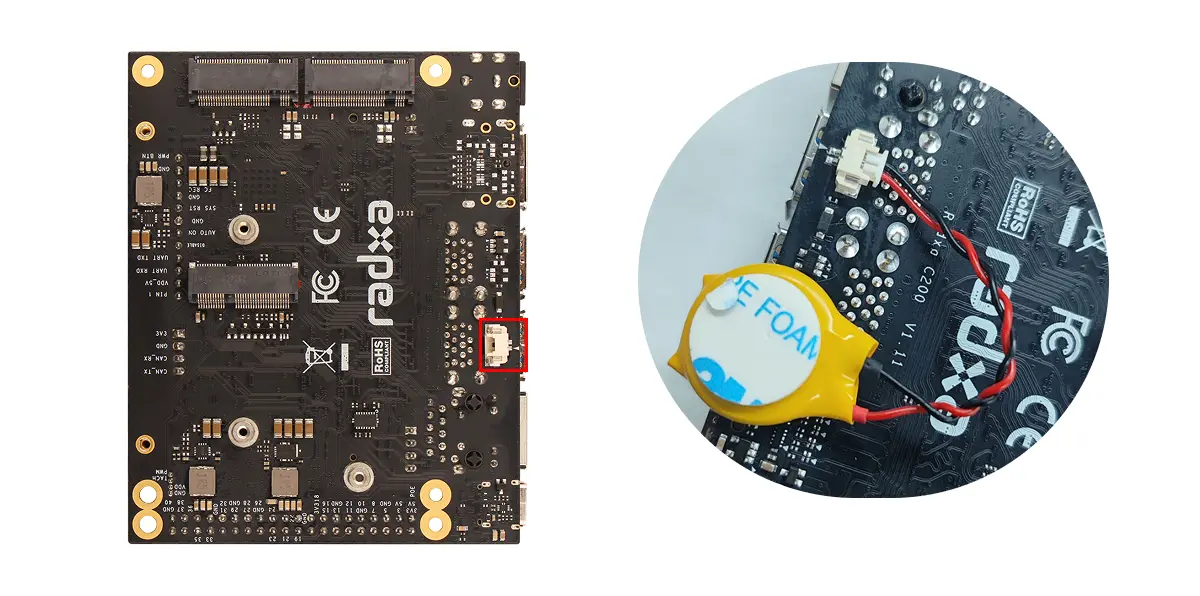
Configure the RTC
Verify RTC hardware
Use the following command to verify that the RTC hardware is working properly.
sudo dmesg | grep rtc
If you see output similar to registered as rtc0, it indicates that the RTC is detected correctly.
Read RTC time
Use the hwclock command to read the current time from the RTC device (/dev/rtc0).
sudo apt update
sudo apt install util-linux util-linux-extra -y
sudo hwclock -r -f /dev/rtc0
Show system time
Use the date command to display the current system time.
date
Set RTC time
If the RTC time does not match the system time, you can use hwclock to write the current system time to the RTC.
sudo hwclock -w -f /dev/rtc0
Verify RTC functionality
Record the current system time, then disconnect board power and network, wait for about 10 minutes, reconnect power, and check whether the system time continues to advance normally.