Install RKDevTool
RKDevTool is a software developed by Rockchip for USB flashing on Windows/Linux/MacOS platforms, designed to simplify and accelerate the development and debugging process for Rockchip series chips.
- Windows
- Linux
- MacOS
- Install Drivers
Download and extract the DriverAssistant v5.14 file.
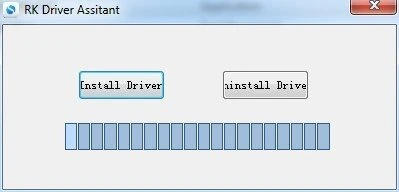
Locate the DriverInstall.exe file and run it as administrator:
To install drivers: Click the Install Driver option
To uninstall drivers: Click the Uninstall Driver option
If you have previously installed other versions of the driver, please uninstall them before installing the new one.
- Download RKDevTool
Download the RKDevTool utility, then extract the downloaded file. The RKDevTool.exe is the executable program - simply double-click to launch the software.
- Install rkdeveloptool
Open your system terminal or command line and run the following commands to install:
sudo apt-get update
sudo apt-get install -y libudev-dev libusb-1.0-0-dev dh-autoreconf pkg-config libusb-1.0 build-essential git wget
git clone https://github.com/rockchip-linux/rkdeveloptool
cd rkdeveloptool
autoreconf -i
./configure
make -j $(nproc)
sudo cp rkdeveloptool /usr/local/sbin/
- Verify Installation
After installing RKDevTool, you can check the version number using the following command:
rkdeveloptool -V
- Install HomeBrew
HomeBrew is a free and open-source package manager that simplifies the process of installing software for MacOS users.
If you don't have HomeBrew installed, you can install it using the following command:
/bin/bash -c "$(curl -fsSL https://raw.githubusercontent.com/Homebrew/install/HEAD/install.sh)"
- Install rkdeveloptool
Open your system terminal or command line and run the following commands to install.
It is recommended to install directly via a third-party Homebrew Tap, no manual compilation needed:
brew tap IgorKha/rkdeveloptool
brew install rkdeveloptool
If the Tap installation fails, you can also compile from source. macOS does not support $(nproc), use make directly. main.cpp uses variable-length arrays (VLA), macOS Clang does not allow VLA in C++ by default, so you need to declare the variable as const first.
brew install automake autoconf libusb pkg-config
git clone https://github.com/rockchip-linux/rkdeveloptool
cd rkdeveloptool
autoreconf -i
./configure
sed -i '' 's/int nSectorSize = 512;/const int nSectorSize = 512;/' main.cpp
make
cp rkdeveloptool /opt/homebrew/bin/
- Verify Installation
After installing RKDevTool, you can check the version number using the following command:
rkdeveloptool -V