RKLLM Installation
RKLLM Overview
RKLLM helps you deploy LLM models to Rockchip SoCs. Currently supported chips include the RK3588 / RK3576 / RK3562 series.
RKLLM architecture:
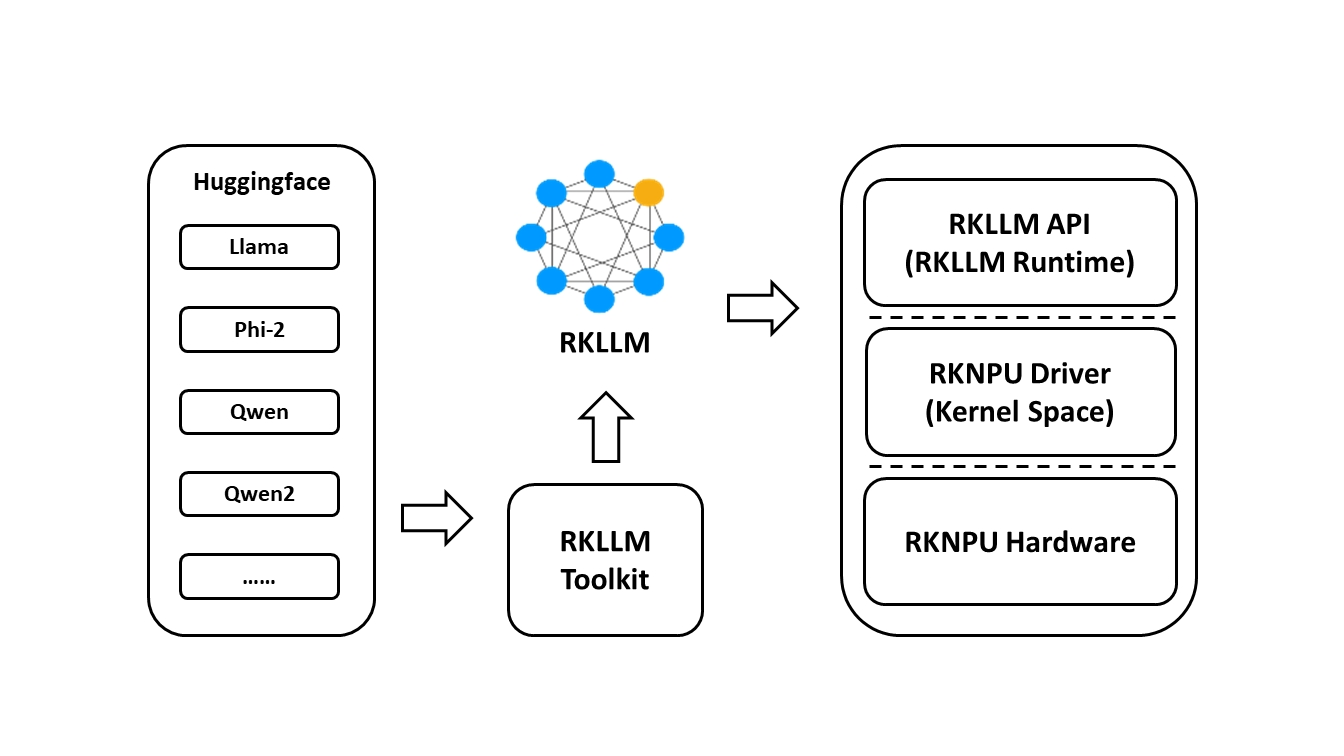
Supported models
- LLAMA models
- TinyLLAMA models
- Qwen models
- Phi models
- ChatGLM3-6B
- Gemma2
- Gemma3
- InternLM2 models
- MiniCPM models
- TeleChat models
- Qwen2-VL-2B-Instruct
- MiniCPM-V-2_6
- DeepSeek-R1-Distill
- Janus-Pro-1B
- InternVL2-1B
- Qwen2.5-VL-3B-Instruct
- Qwen3
Download the SDK
Go to your SDK directory and clone the RKLLM repository.
cd RKSDK
git clone -b release-v1.2.3 https://github.com/airockchip/rknn-llm.git
Install Miniforge
wget https://github.com/conda-forge/miniforge/releases/download/25.11.0-0/Miniforge3-25.11.0-0-Linux-x86_64.sh
chmod +x Miniforge3-25.11.0-0-Linux-x86_64.sh
bash Miniforge3-25.11.0-0-Linux-x86_64.sh
Create a virtual environment
conda create -n rkllm python=3.12
Activate the virtual environment
conda activate rkllm
Install dependencies
cd rknn-llm/rkllm-toolkit/packages
pip install rkllm_toolkit-1.2.3-cp312-cp312-linux_x86_64.whl
Verify the installation
If the following commands run without errors, the installation is successful.
$python3
>>>from rkllm.api import RKLLM
Toolchain for building on-device examples
To build the on-device runtime examples, you need a cross-compilation toolchain.
Download the officially recommended version: gcc-arm-10.2-2020.11-x86_64-aarch64-none-linux-gnu.
Extract it after downloading.
Before building, export the compiler path so the scripts can find the toolchain.
export GCC_COMPILER=/path/to/your/gcc/bin/aarch64-linux-gnu
Device driver requirements
RKLLM requires a newer RKNPU driver. Before running RKLLM Runtime on the device, confirm that your RKNPU driver is v0.9.8.
Radxa OS 6.1 images may ship with RKNPU driver 0.9.6 by default.
Upgrade via sudo rsetup -> System -> System Update to get RKNPU driver 0.9.8.
After upgrading, run sudo apt autopurge and reboot.
Some CLI / minimal images may not have the RKNPU2 userspace package preinstalled that RKLLM requires. If you see failed to open rknpu module or failed to open rknn device when running llm_demo, install the RKNPU2 package for your SoC and reboot first.
sudo apt update
# RK3588 / RK3582 series
sudo apt install rknpu2-rk3588
# RK356X series: sudo apt install rknpu2-rk356x
sudo reboot
Check the driver version:
$ sudo cat /sys/kernel/debug/rknpu/version
RKNPU driver: v0.9.8
Optional: build the NPU driver manually
If you are using a non-official firmware image, you may need to update the kernel.
The RKNPU driver package supports two major kernel versions:
kernel-5.10 and
kernel-6.1.
You can confirm the exact version in the kernel root Makefile. The general update steps are:
-
Download rknpu_driver_0.9.8_20241009.tar.bz2.
-
Extract it and overwrite the
rknpudriver sources in your kernel tree. -
Rebuild the kernel.
-
Flash the newly built kernel to the device.
Clone the repository on the device
RKLLM Runtime provides C/C++ APIs for Rockchip NPUs to help you deploy RKLLM models and accelerate LLM applications.
Clone the RKLLM repository on the device:
git clone -b release-v1.2.3 https://github.com/airockchip/rknn-llm.git