Compile / Flash Radxa BIOS Firmware
By flashing the BIOS firmware provided by Radxa, you can boot the system from USB drives or NVMe SSDs.
If you have installed the system using SDK Manager or command line, it will erase the pre-installed BIOS firmware of the Radxa C200 Orin Development Kit, and you won't be able to boot the system from a USB drive. You can reflash the Radxa BIOS firmware using the following method.
Environment Setup
Hardware Configuration
It is recommended to perform the system installation on a host running Ubuntu 22.04. If you are using a virtual machine to run Ubuntu 22.04, make sure the mainboard is connected to the virtual machine during the BIOS firmware flashing process.
- Ubuntu 22.04
Install Docker
Run the following commands to install Docker and set up permissions:
sudo apt update
sudo apt install docker.io
sudo usermod -a -G docker ${USER}
newgrp docker
After completing the above operations, open a new terminal and enter the docker --version command. If Docker version information is displayed, Docker has been successfully installed.
Compile Radxa BIOS Firmware
Install Dependencies
sudo apt install make gcc device-tree-compiler build-essential flex bison libssl-dev -y
Clone Source Code
git clone https://github.com/radxa/c200-bootupd.git
Compile Source Code
cd c200-bootupd
DTC=/usr/bin/dtc make build
After successful compilation, the terminal will display the message DTBs compiled successfully.
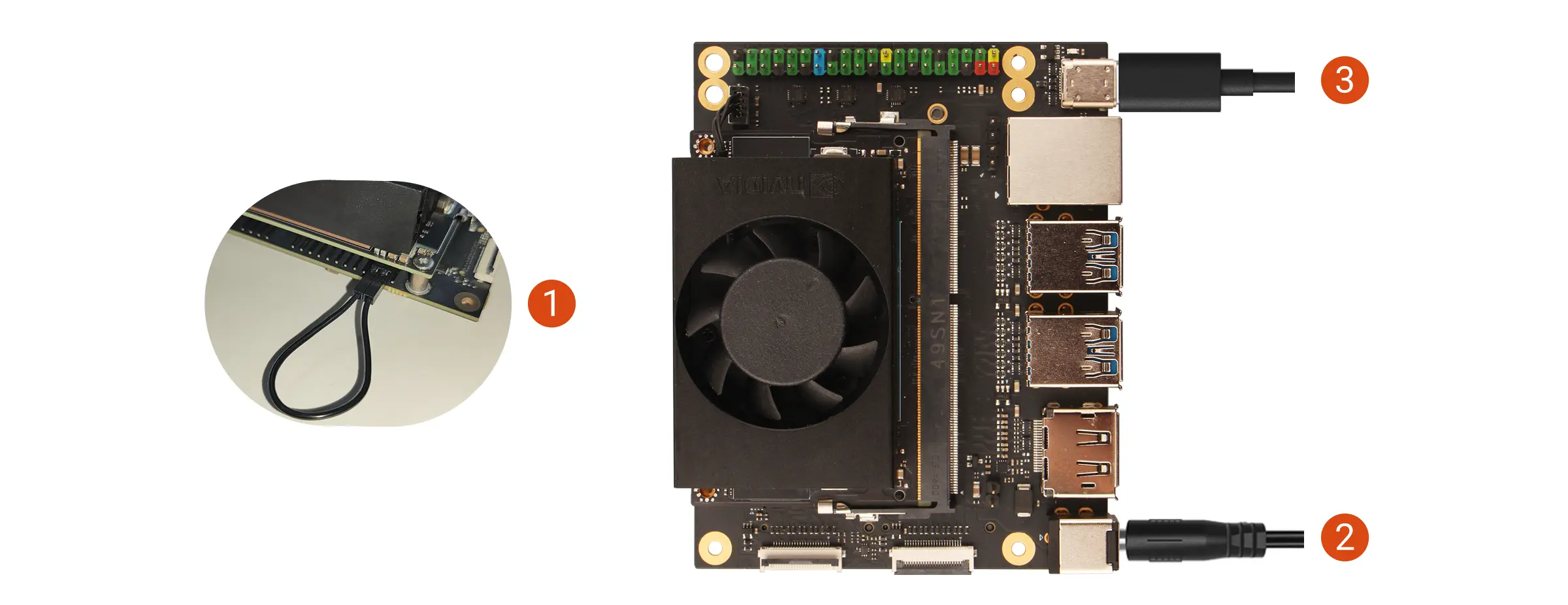
Hardware Connection
- Use a jumper cap or DuPont wire to short the FC REC and GND pins
- Power on the Radxa C200 Orin Development Kit using the power adapter
- Connect the mainboard to your computer using a USB Type-C cable
To enter Recovery Mode, simply ensure the FC REC pin is connected to GND during the boot process. You can remove the jumper cap or DuPont wire during the system flashing process.
The FC REC pin and GND pin locations can be referenced in the GPIO interface documentation
Flash Firmware
make flash_spi
After successful flashing, the terminal will display the message The target generic has been flashed successfully.
Check if the jumper cap or DuPont wire connecting the FC REC pin and GND pin has been removed to prevent the system from directly entering Recovery Mode on the next boot.