Use Radxa Prebuilt BIOS Firmware
Using Radxa prebuilt BIOS firmware is more convenient than rebuilding and flashing the BIOS yourself, and avoids the complexity of compiling and flashing firmware manually.
Hardware Requirements
It is recommended to use an Ubuntu 22.04 host to perform the installation. If you are running Ubuntu 22.04 in a virtual machine, make sure the board is passed through to the VM during the BIOS flashing process.
- Ubuntu 22.04
Hardware Connections
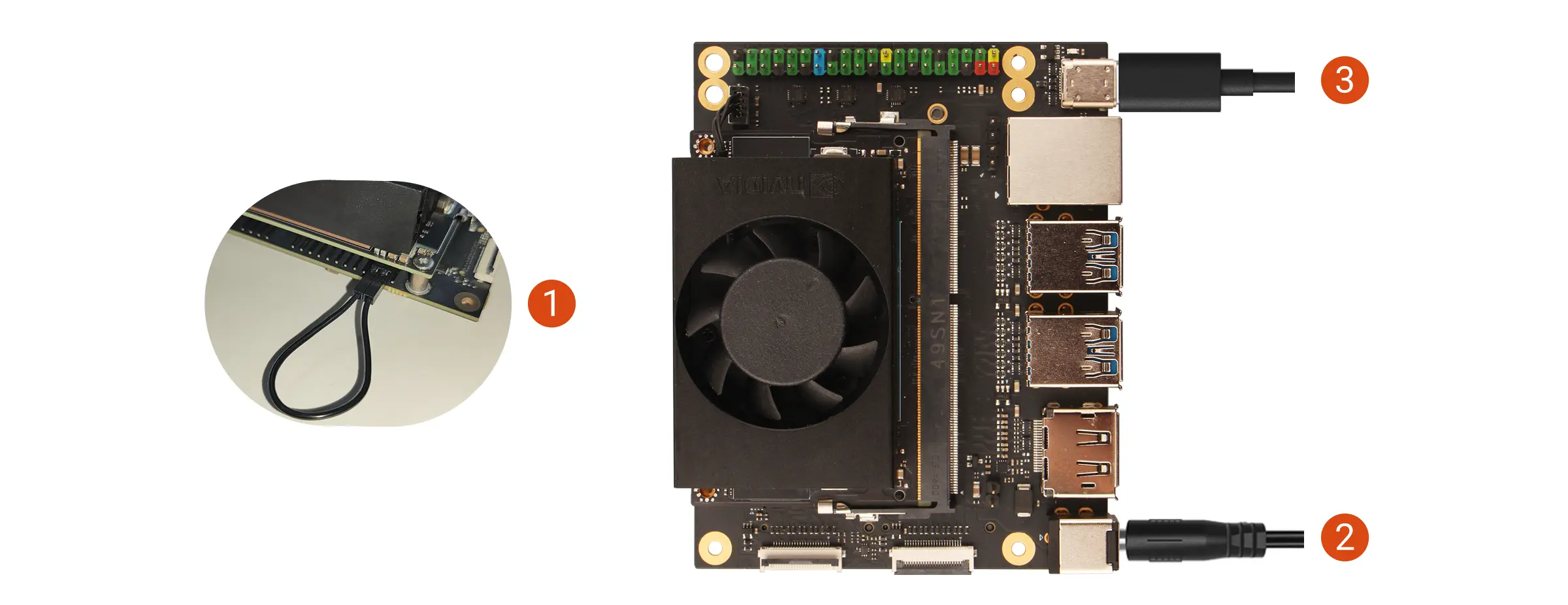
- Use a jumper cap or DuPont wire to short the FC REC pin to GND.
- Power the Radxa C200 Orin developer kit with the board power adapter.
- Connect the board to the host PC using a USB Type‑C data cable.
To enter Recovery mode, it is sufficient that the FC REC pin is detected as connected to GND during power‑on. You may remove the jumper cap or DuPont wire during the flashing process.
The FC REC pin and GND pin locations can be referenced in the GPIO interface documentation
Download and Extract the Source
Download the NVIDIA L4T source package.
wget https://developer.download.nvidia.com/embedded/L4T/r36_Release_v4.4/release/Jetson_Linux_R36.4.4_aarch64.tbz2 -O Jetson_Linux_aarch64.tbz2
tar -xf Jetson_Linux_aarch64.tbz2
Download the Prebuilt Firmware
Download the Radxa prebuilt BIOS firmware to the specified directory.
cd Linux_for_Tegra
# For Radxa C200 Orin Developer Kit:
wget https://github.com/radxa/c200-bootupd/releases/latest/download/uefi_jetson_c200.bin -O bootloader/uefi_jetson.bin
Flash the BIOS Firmware
Use the flashing script provided by NVIDIA to flash the BIOS firmware.
sudo ./flash.sh p3768-0000-p3767-0000-a0-qspi internal
After flashing succeeds, check that the jumper cap or DuPont wire shorting FC REC and GND has been removed to avoid entering Recovery mode directly on the next boot.