EasyOCR 示例
此文档讲述使用 QAI AppBuilder Python API 利用 Qualcomm® Hexagon™ Processor (NPU) 推理 EasyOCR 文本识别模型。
示例支持设备
| 设备 | SoC |
|---|---|
| Fogwise® AIRbox Q900 | QCS9075 |
安装 QAI AppBuilder
提示
-
请根据 QAI AppBuilder 安装方法 安装 QAI AppBuilder。
-
请根据 创建 ADSP 环境变量 配置 ADSP 环境变量。
运行示例
安装依赖
在已激活的虚拟环境中安装示例依赖:
Device
pip3 install requests tqdm qai-hub py3-wget Pillow torch torchvision opencv-python-headless easyocr
运行脚本
-
进入上游示例目录
Devicecd qai-appbuilder/samples -
准备输入数据(示例自带
ch_en.png/english.png;也可通过--Image_Path指定)
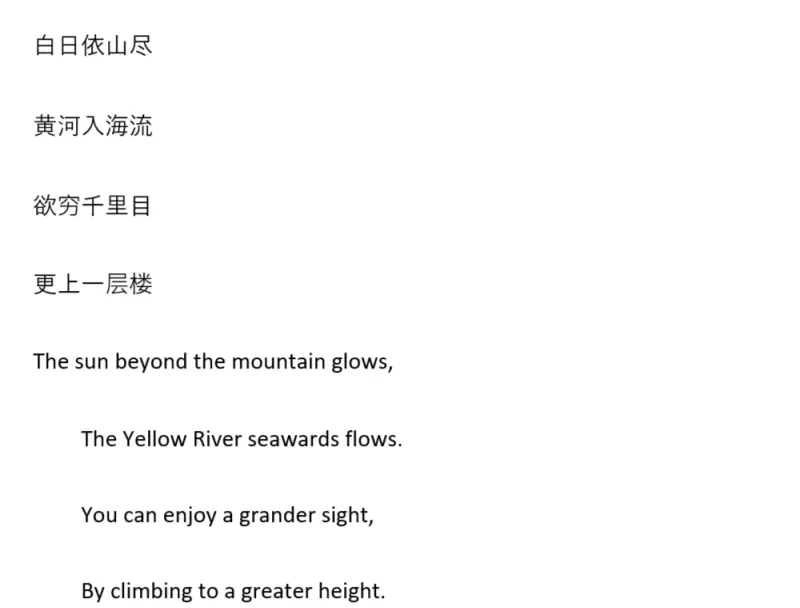
input image
注意
在 AIRbox Q900(QCS9075)上实测:上游 easy_ocr.py 里 DataLoader(..., num_workers=1) 会 fork 子进程,导致 QNN HTP context 被释放,识别阶段报错:
RuntimeError: Cannot perform 'Inference': context 'EasyOCRRecognizer' has been released.
运行前请将 Multimodal/Image_To_Text/easy_ocr/easy_ocr.py 中所有 num_workers=int(workers) 改为 num_workers=0(或把 recognizer_get_text 的 workers 默认值改为 0)。
-
执行推理
Devicepython3 Multimodal/Image_To_Text/easy_ocr/easy_ocr.py --chipset 9075
成功时终端会打印识别到的中英文文本,例如(默认中英对照输入图):
白日依山尽
黄河入海流
欲穷千里目
更上一层楼
The sun beyond the mountain glows,
The Yellow River seawards flows_
You can enjoy a grander sight,
By climbing to a greater height。
Saving image to .../samples/build/image.png
提示
首次运行会通过 Qualcomm® AI Hub 下载 Detector / Recognizer(含中英)模型,体积较大。也可在 samples 目录使用启动器(仍需先完成 num_workers=0 修改):
python3 run_inference.py --list
python3 run_inference.py --model easy_ocr --args "--chipset 9075"