AMR 简单运动控制
通过键盘控制仿真 AMR(自主移动机器人)在 Gazebo 中的运动。控制节点将 Twist 命令发布到 /qrb_robot_base/cmd_vel,经 ros_gz_bridge 转发至 Gazebo 差速驱动系统,odom 反馈确认机器人实际移动。
数据流
simple_motion → /qrb_robot_base/cmd_vel → ros_gz_bridge → Gazebo → /qrb_robot_base/odom
前提条件
- 已完成 QIR SDK 安装
- 已连接显示器(GUI 模式)或准备 headless 验证
源码构建
步骤 1:安装依赖
radxa@airbox$
sudo apt install -y \
  ros-jazzy-ros-gz \
  ros-jazzy-gz-ros2-control \
  ros-jazzy-ros2-controllers
步骤 2:克隆并构建
radxa@airbox$
git clone https://github.com/qualcomm-qrb-ros/qrb_ros_simulation.git
cd qrb_ros_simulation
source /opt/ros/jazzy/setup.bash
colcon build --cmake-args -DBUILD_TESTING=OFF
运行(GUI 模式)
终端 1 — 在桌面终端中启动 Gazebo 仿真:
radxa@airbox$
source /opt/ros/jazzy/setup.bash
source ~/qrb_ros_simulation/install/setup.bash
ros2 launch qrb_ros_sim_gazebo gazebo_robot_base.launch.py \
  namespace:=qrb_robot_base enable_laser:=false enable_imu:=false
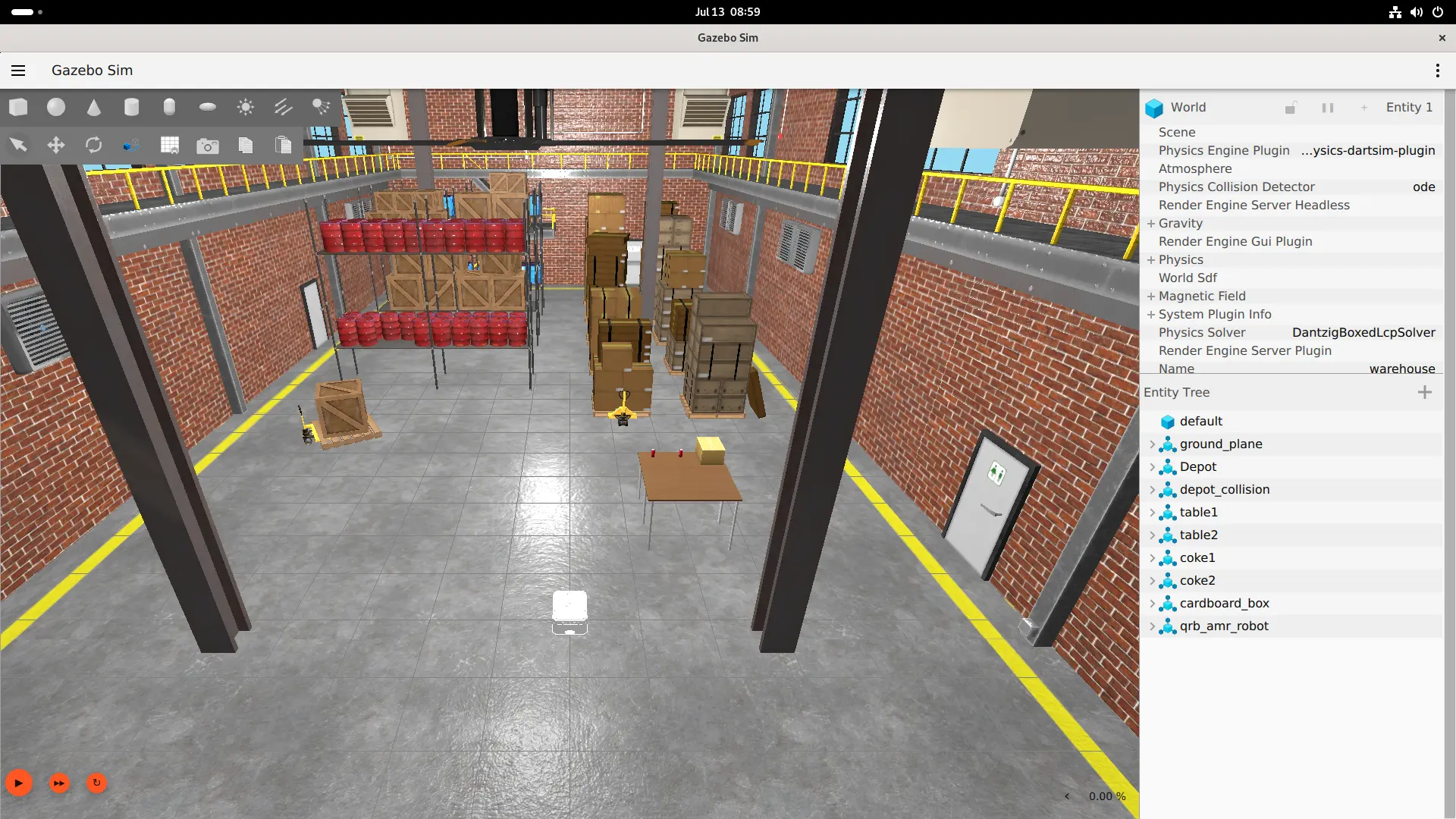
Gazebo 窗口打开后,点击左下角的播放按钮 启动仿真。
终端 2 — 启动控制器:
radxa@airbox$
ros2 run simulation_sample_amr_simple_motion simple_motion
键盘控制
| 按键 | 命令 | Twist 值 |
|---|---|---|
i | 前进 | linear.x = 0.5 |
, | 后退 | linear.x = -0.5 |
j | 逆时针 | angular.z = 0.5 |
l | 顺时针 | angular.z = -0.5 |
k | 停止 | linear.x = 0.0 |
q | 退出 |
验证
按 i 发送前进命令后,Gazebo 窗口中的 AMR 应可见移动。可通过 odom 话题确认:
radxa@airbox$
source /opt/ros/jazzy/setup.bash
ros2 topic echo /qrb_robot_base/odom --field pose.pose.position.x
预期 position.x 从约 0 增长。
Headless 模式
无需显示器时,使用 headless launch 仅运行 Gazebo 服务器和 ros_gz_bridge:
radxa@airbox$
source /opt/ros/jazzy/setup.bash
source ~/qrb_ros_simulation/install/setup.bash
ros2 launch qrb_ros_sim_gazebo gazebo_robot_base.launch.py \
  namespace:=qrb_robot_base enable_laser:=false enable_imu:=false \
  headless:=true
扩展:导航与 SLAM
启用激光雷达和 IMU 以获得完整传感器组:
ros2 launch qrb_ros_sim_gazebo gazebo_robot_base.launch.py \
  namespace:=qrb_robot_base \
  enable_laser:=true \
  enable_imu:=true \
  enable_odom:=true \
  enable_odom_tf:=true
可用接口:
| 话题 | 类型 |
|---|---|
/qrb_robot_base/cmd_vel | Twist |
/qrb_robot_base/odom | Odometry |
/qrb_robot_base/joint_states | JointState |
/qrb_robot_base/tf | TFMessage |
/qrb_robot_base/scan | LaserScan(需 enable_laser:=true) |
/qrb_robot_base/imu | Imu(需 enable_imu:=true) |
支持在此基础上开发 Nav2 导航、2D SLAM、避障、路径规划等功能(需额外安装对应软件包)。
注意:官方文档描述的 x86 主机运行 Gazebo + Q900 通过 DDS 控制的跨机器拓扑尚未验证。如果采用该方案,需确保主机与 Q900 的
ROS_DOMAIN_ID一致且网络支持多播。