单目深度估计
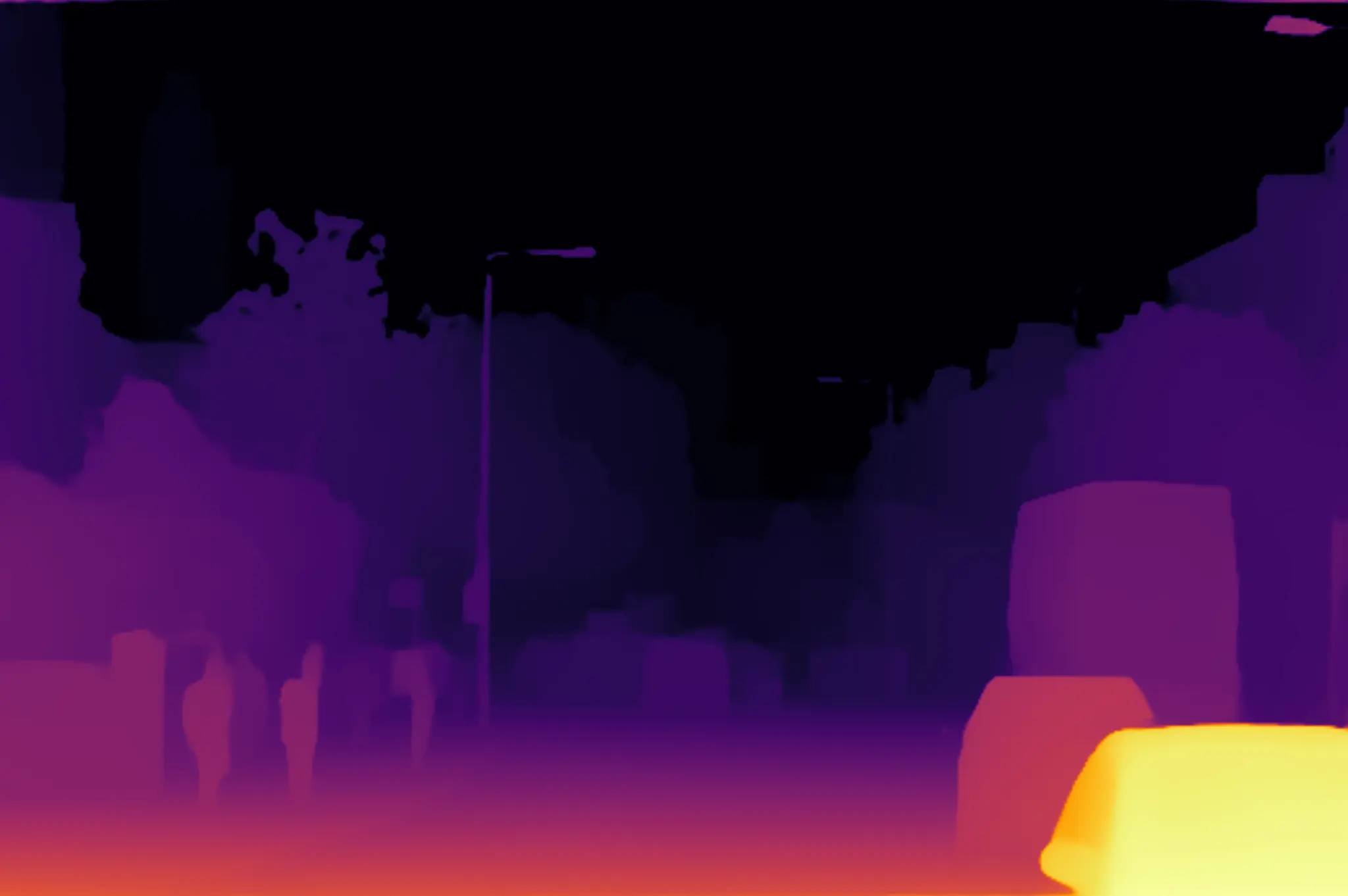
使用预装 RGB 图片运行 Depth Anything V2 单目深度估计。示例通过 QNN HTP 后端在 DSP 上执行推理,将结果归一化并转换为 Inferno 伪彩色图片,然后发布到 /sample_container/depth_map。
该话题用于呈现场景内的相对深度关系,不包含公制距离或原始浮点深度值。本文仅介绍图片输入,未验证 GMSL 或 QRB 摄像头输入。
管线
input_image.jpg
  -> image_publisher -> /image_raw
  -> 图像缩放、填充和归一化
  -> /sample_container/qrb_inference_input_tensor
  -> QNN Depth Anything V2 推理
  -> /sample_container/qrb_inference_output_tensor
  -> 裁剪、恢复尺寸和 Inferno 伪彩色映射
  -> /sample_container/depth_map
前提条件
- 已完成 QIR SDK 安装
- Q900 可以访问 GitHub 和 Hugging Face
/opt/model至少有 70 MB 可用空间
准备模型
下载 Qualcomm 发布的固定版本 Depth Anything V2 模型:
sudo mkdir -p /opt/model
sudo wget \
  https://huggingface.co/qualcomm/Depth-Anything-V2/resolve/19ce3645e11de17eed7e869eebcc07dd352834f3/Depth-Anything-V2.bin?download=true \
  -O /opt/model/Depth-Anything-V2.bin
校验模型:
echo "890891c3699ee9dbe98c6f30cf0bb93c48372b2fb150c9415d1b0684fa0c637b  /opt/model/Depth-Anything-V2.bin" | \
  sha256sum --check
预期输出:
/opt/model/Depth-Anything-V2.bin: OK
源码构建
步骤 1:安装依赖
sudo apt install -y ros-dev-tools ros-jazzy-qrb-ros-camera
QIR SDK 已提供 image_publisher、qrb_ros_nn_inference、cv_bridge 和消息接口等其余运行依赖。
当前 rosdep 数据库无法解析源码中的
qrb_ros_camera键,因此rosdep install会退出并提示Cannot locate rosdep definition for [qrb_ros_camera]。安装上面的 Debian 软件包后可直接构建。
步骤 2:克隆源码
mkdir -p ~/qrb_ros_ws/src && cd ~/qrb_ros_ws/src
git clone -b jazzy-rel https://github.com/qualcomm-qrb-ros/qrb_ros_samples.git
步骤 3:构建示例
cd ~/qrb_ros_ws/src/qrb_ros_samples/ai_vision/sample_depth_estimation
source /opt/ros/jazzy/setup.bash
colcon build --cmake-args -DBUILD_TESTING=OFF
预期输出:
Starting >>> sample_depth_estimation
Finished <<< sample_depth_estimation
Summary: 1 package finished
运行
cd ~/qrb_ros_ws/src/qrb_ros_samples/ai_vision/sample_depth_estimation
source /opt/ros/jazzy/setup.bash
source install/setup.bash
export ROS_DOMAIN_ID=123
ros2 launch sample_depth_estimation launch_with_image_publisher.py
launch 文件默认以 10 Hz 发布源码中的 resource/input_image.jpg。也可以通过绝对路径指定其他图片或模型:
ros2 launch sample_depth_estimation launch_with_image_publisher.py \
  image_path:=<your-local-image-path> \
  model_path:=<your-local-model-path>
预期输出
模型完成初始化,并持续执行推理和发布深度图:
Loading model from binary file: /opt/model/Depth-Anything-V2.bin
/usr/lib/libQnnHtp.so initialize successfully
Qnn device initialize successfully
Initialize Qnn graph from binary file successfully
Inference init successfully!
Inference execute successfully!
Published depth map
实机捕获的 /sample_container/depth_map 如下:
验证
在另一个终端中确认结果话题:
export ROS_DOMAIN_ID=123
source /opt/ros/jazzy/setup.bash
ros2 topic info /sample_container/depth_map -v
预期结果包含:
Type: sensor_msgs/msg/Image
Publisher count: 1
Node name: depth_estimation_node
Node namespace: /sample_container
默认结果图片应为 2048 x 1362 的 bgr8 图片。近景区域通常显示为较亮的黄色或红色,远景区域显示为较暗的紫色或黑色。
需要图形化查看时,在与 Q900 使用相同 ROS_DOMAIN_ID 的 ROS 2 Jazzy 桌面环境中启动 rqt,依次选择 Plugins > Visualization > Image View,再选择 /sample_container/depth_map。
停止
在运行示例的终端中按 Ctrl + C。
连续推理期间停止时,QNN 容器可能打印 FastRPC 传输错误并以 -11 退出。该错误发生在关闭阶段,不影响此前已发布的深度图;确认相关进程退出后即可。
限制
- 本次仅验证预装图片输入,未验证 GMSL 或 QRB 摄像头输入。
- 未验证跨设备
rqt显示,仅验证 Q900 本地推理和结果话题发布。 - 输出是按当前图片归一化的相对深度伪彩色图,不能直接用于测量实际距离。