Nano SIM 卡槽
瑞莎 Fogwise® AIRbox Q900 板载 1 个 Nano SIM 卡槽,支持安装 Nano SIM 卡。
硬件连接
实现移动网络需要安装 Nano SIM 卡和 4G/5G 模块。
说明:教程以移远 LTE EC20 为例。
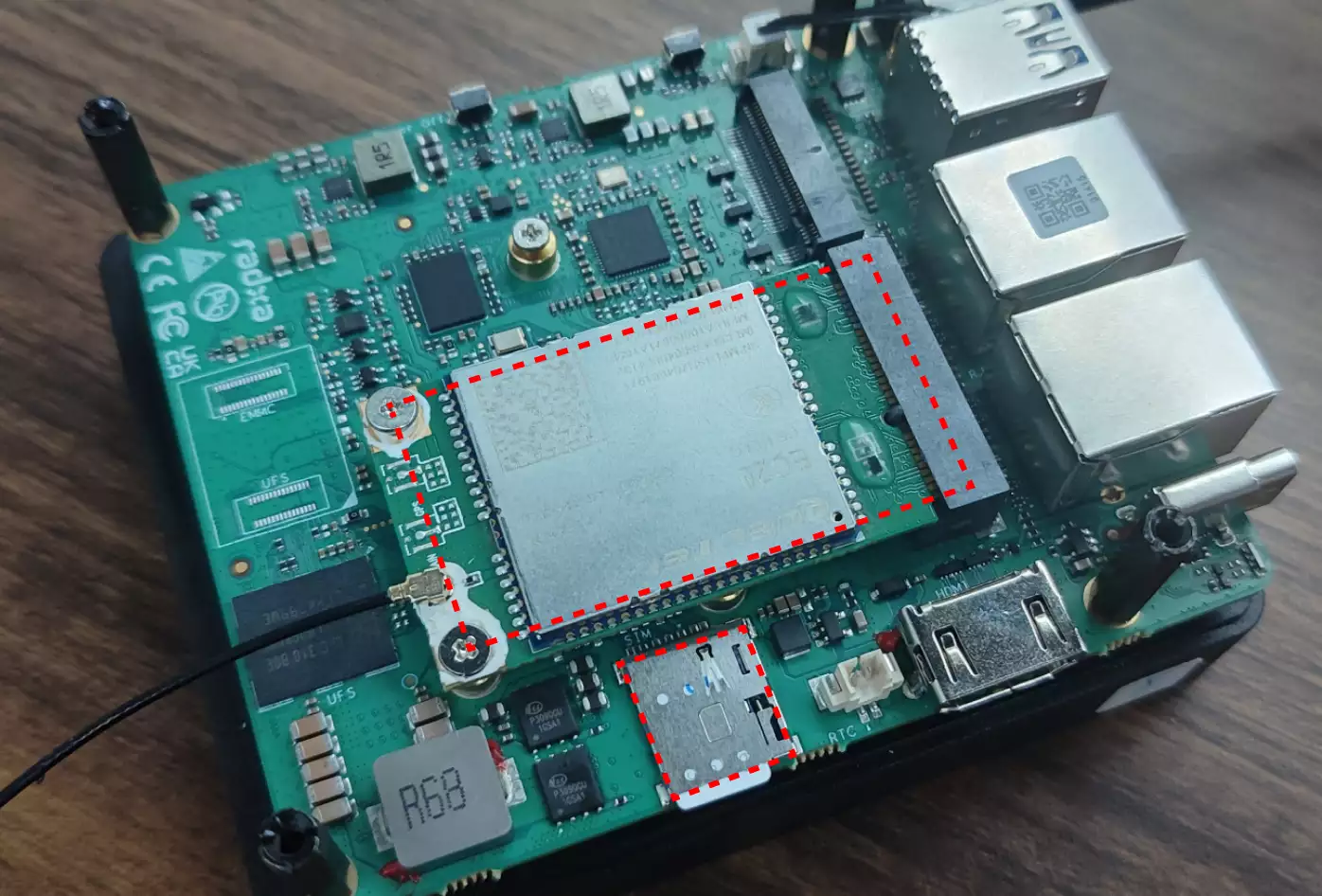
使用指南
验证 4G/5G 模块
可以使用 lsusb 命令查看 4G/5G 模块是否正常识别。
radxa@airbox$
lsusb | grep -i Quectel
若系统识别正常,终端会输出类似信息:
Bus 005 Device 002: ID 2c7c:0125 Quectel Wireless Solutions Co., Ltd. EC25 LTE modem
检查 cdc-wdm 设备
使用 ls 命令检查系统是否正常枚举出 cdc-wdm 设备。
radxa@airbox$
ls /dev/cdc-wdm*
若识别正常,终端会输出类似信息:
/dev/cdc-wdm0
安装软件
安装拨号上网相关软件包。
radxa@airbox$
sudo apt install libqmi-utils modemmanager -y
检查数据端口格式
radxa@airbox$
sudo qmicli -d /dev/cdc-wdm0 -e
正常应该配置为 raw-ip,否则需要使用 sudo qmicli -d /dev/cdc-wdm0 -E raw-ip 命令设置,并重启板子。
- 检查数据网络接口
radxa@airbox$
sudo qmicli -d /dev/cdc-wdm0 -w
正常应该配置为 wwan0,否则需要使用 sudo qmicli -d /dev/cdc-wdm0 -w wwan0 命令设置,并重启板子。
创建网络接口配置
使用 nmcli 命令创建网络接口配置。
radxa@airbox$
sudo nmcli connection add type gsm ifname cdc-wdm0
若创建成功,终端会输出类似信息:
Connection 'gsm-cdc-wdm0' (6a044568-6947-436e-9b46-51a1f2a9b65d) successfully added.
根据运营商要求编辑网络接口配置(可选)
此操作为可选项,如果网络连接异常,可以参考以下操作编辑 apn、username、password 等运营商相关配置。
radxa@airbox$
sudo nmcli connection edit gsm-cdc-wdm0
终端会自动进入交互式界面,可以输入 help 或 ? 查看帮助信息。
===| nmcli interactive connection editor |===

Editing existing 'gsm' connection: 'gsm-cdc-wdm0'

Type 'help' or '?' for available commands.
Type 'print' to show all the connection properties.
Type 'describe [<setting>.<prop>]' for detailed property description.

You may edit the following settings: connection, gsm, serial, ppp, match, ipv4, ipv6, hostname, link, tc, proxy
nmcli> set gsm.apn ctlte
nmcli> save
Connection 'gsm-cdc-wdm0' (e26d1d79-ba6b-44f3-9135-1ef7a80d982a) successfully updated.
nmcli> quit
验证网络
使用 ip a 命令查看 wwan0 接口是否正常配置 IP。
radxa@airbox$
ip a
若连接成功,终端会输出类似信息:
···
4: wwan0: <POINTOPOINT,MULTICAST,NOARP,UP,LOWER_UP> mtu 1500 qdisc pfifo_fast state UNKNOWN group default qlen 1000
    link/none
    inet 10.10.24.33/30 brd 10.10.24.35 scope global noprefixroute wwan0
       valid_lft forever preferred_lft forever
···
若接口无 IP 信息,可以使用 sudo nmcli connection up gsm-cdc-wdm0 命令重启网络接口。
使用 ping 命令测试网络连接。
radxa@airbox$
sudo ping baidu.com -I wwan0 -c 5
若网络正常,终端会输出类似信息:
PING baidu.com (220.181.7.203) from 10.10.24.33 wwan0: 56(84) bytes of data.
64 bytes from 220.181.7.203: icmp_seq=1 ttl=52 time=60.6 ms
64 bytes from 220.181.7.203: icmp_seq=2 ttl=52 time=59.5 ms
64 bytes from 220.181.7.203: icmp_seq=3 ttl=52 time=68.7 ms
64 bytes from 220.181.7.203: icmp_seq=4 ttl=52 time=66.9 ms
64 bytes from 220.181.7.203: icmp_seq=5 ttl=52 time=64.2 ms

--- baidu.com ping statistics ---
5 packets transmitted, 5 received, 0% packet loss, time 4006ms
rtt min/avg/max/mdev = 59.494/63.983/68.727/3.540 ms