YOLO World
环境配置
信息
参考 RKNN 安装 配置好相关环境。
参考 RKNN Model Zoo 下载示例文件。
模型下载
下载 onnx 模型文件。
X64 Linux PC
cd rknn_model_zoo/examples/yolo_world/model/
bash download_model.sh
模型转换
选择目标平台。
- rk3588
- rk356x
- rk3576
X64 Linux PC
export TARGET_PLATFORM=rk3588
X64 Linux PC
export TARGET_PLATFORM=rk356x
X64 Linux PC
export TARGET_PLATFORM=rk3576
将 onnx 模型转换为 rknn 模型。
X64 Linux PC
cd ../python/
python convert.py ../model/clip_text.onnx ${TARGET_PLATFORM}
python convert.py ../model/yolo_world_v2s.onnx ${TARGET_PLATFORM}
C API
编译示例
切换到 rknn_model_zoo 目录下执行 build-linux.sh 编译脚本。
X64 Linux PC
cd ../../..
bash build-linux.sh -t ${TARGET_PLATFORM} -a aarch64 -d yolo_world
文件同步
然后将编译生成的 install 目录下的 demo 目录推送到板端。
X64 Linux PC
cd install/${TARGET_PLATFORM}_linux_aarch64/
scp -r rknn_yolo_world_demo/ user@your_device_ip:target_directory
运行示例
导出运行时库到环境变量。
Device
cd rknn_yolo_world_demo/
export LD_LIBRARY_PATH=./lib
运行示例。
Device
./rknn_yolo_world_demo ./model/clip_text.rknn ./model/detect_classes.txt ./model/yolo_world_v2s.rknn ./model/bus.jpg
$ ./rknn_yolo_world_demo ./model/clip_text.rknn ./model/detect_classes.txt ./model/yolo_world_v2s.rknn ./model/bus.jpg
--> init clip text model
model input num: 1, output num: 1
input tensors:
  index=0, name=input_ids, n_dims=2, dims=[1, 20], n_elems=20, size=160, fmt=UNDEFINED, type=INT64, qnt_type=AFFINE, zp=0, scale=1.000000
output tensors:
  index=0, name=text_embeds, n_dims=2, dims=[1, 512], n_elems=512, size=1024, fmt=UNDEFINED, type=FP16, qnt_type=AFFINE, zp=0, scale=1.000000
load label ./model/detect_classes.txt
--> init yolo world model
model input num: 2, output num: 6
input tensors:
  index=0, name=images, n_dims=4, dims=[1, 640, 640, 3], n_elems=1228800, size=1228800, fmt=NHWC, type=INT8, qnt_type=AFFINE, zp=-128, scale=0.003922
  index=1, name=texts, n_dims=3, dims=[1, 80, 512], n_elems=40960, size=40960, fmt=UNDEFINED, type=INT8, qnt_type=AFFINE, zp=-52, scale=0.003410
output tensors:
  index=0, name=1168, n_dims=4, dims=[1, 80, 80, 80], n_elems=512000, size=512000, fmt=NCHW, type=INT8, qnt_type=AFFINE, zp=-128, scale=0.003214
  index=1, name=1076, n_dims=4, dims=[1, 4, 80, 80], n_elems=25600, size=25600, fmt=NCHW, type=INT8, qnt_type=AFFINE, zp=-128, scale=0.054310
  index=2, name=1170, n_dims=4, dims=[1, 80, 40, 40], n_elems=128000, size=128000, fmt=NCHW, type=INT8, qnt_type=AFFINE, zp=-128, scale=0.003697
  index=3, name=1121, n_dims=4, dims=[1, 4, 40, 40], n_elems=6400, size=6400, fmt=NCHW, type=INT8, qnt_type=AFFINE, zp=-128, scale=0.057563
  index=4, name=1172, n_dims=4, dims=[1, 80, 20, 20], n_elems=32000, size=32000, fmt=NCHW, type=INT8, qnt_type=AFFINE, zp=-128, scale=0.003884
  index=5, name=1166, n_dims=4, dims=[1, 4, 20, 20], n_elems=1600, size=1600, fmt=NCHW, type=INT8, qnt_type=AFFINE, zp=-128, scale=0.058563
model is NHWC input fmt
model input height=640, width=640, channel=3
num_lines=80
origin size=640x640 crop size=640x640
input image: 640 x 640, subsampling: 4:2:0, colorspace: YCbCr, orientation: 1
--> inference clip text model
rknn_run_1
rknn_run_2
rknn_run_3
rknn_run_4
rknn_run_5
rknn_run_6
rknn_run_7
rknn_run_8
rknn_run_9
rknn_run_10
rknn_run_11
rknn_run_12
rknn_run_13
rknn_run_14
rknn_run_15
rknn_run_16
rknn_run_17
rknn_run_18
rknn_run_19
rknn_run_20
rknn_run_21
rknn_run_22
rknn_run_23
rknn_run_24
rknn_run_25
rknn_run_26
rknn_run_27
rknn_run_28
rknn_run_29
rknn_run_30
rknn_run_31
rknn_run_32
rknn_run_33
rknn_run_34
rknn_run_35
rknn_run_36
rknn_run_37
rknn_run_38
rknn_run_39
rknn_run_40
rknn_run_41
rknn_run_42
rknn_run_43
rknn_run_44
rknn_run_45
rknn_run_46
rknn_run_47
rknn_run_48
rknn_run_49
rknn_run_50
rknn_run_51
rknn_run_52
rknn_run_53
rknn_run_54
rknn_run_55
rknn_run_56
rknn_run_57
rknn_run_58
rknn_run_59
rknn_run_60
rknn_run_61
rknn_run_62
rknn_run_63
rknn_run_64
rknn_run_65
rknn_run_66
rknn_run_67
rknn_run_68
rknn_run_69
rknn_run_70
rknn_run_71
rknn_run_72
rknn_run_73
rknn_run_74
rknn_run_75
rknn_run_76
rknn_run_77
rknn_run_78
rknn_run_79
rknn_run_80
--> inference yolo world model
scale=1.000000 dst_box=(0 0 639 639) allow_slight_change=1 _left_offset=0 _top_offset=0 padding_w=0 padding_h=0
rga_api version 1.10.1_[0]
rknn_run
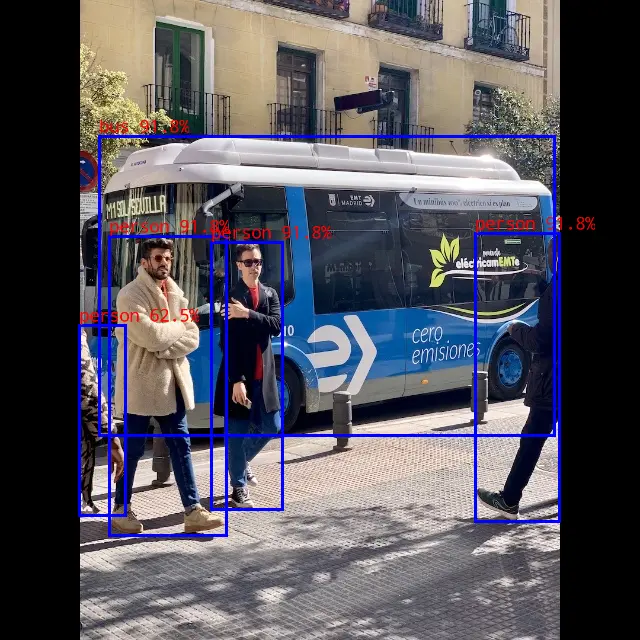
person @ (475 234 559 519) 0.948
person @ (110 237 226 535) 0.948
bus @ (96 135 551 436) 0.932
person @ (212 240 283 510) 0.917
person @ (80 326 125 514) 0.665
write_image path: out.png width=640 height=640 channel=3 data=0xffff8189b010
效果展示
Python API
激活虚拟环境
Device
conda activate rknn
运行示例
将相关文件推送到板端执行下面的命令。
Device
python yolo_world.py --text_model ../model/clip_text.rknn --yolo_world ../model/yolo_world_v2s.rknn --target ${TARGET_PLATFORM}
$ python yolo_world.py --text_model ../model/clip_text.rknn --yolo_world ../model/yolo_world_v2s.rknn --target rk3588
/home/radxa/miniforge3/envs/rknn/lib/python3.12/site-packages/rknn/api/rknn.py:51: UserWarning: pkg_resources is deprecated as an API. See https://setuptools.pypa.io/en/latest/pkg_resources.html. The pkg_resources package is slated for removal as early as 2025-11-30. Refrain from using this package or pin to Setuptools<81.
  self.rknn_base = RKNNBase(cur_path, verbose)
I rknn-toolkit2 version: 2.3.2
I target set by user is: rk3588
W inference: The 'data_format' is not set, and its default value is 'nhwc'!
W inference: The 'data_format' is not set, and its default value is 'nhwc'!
W inference: The 'data_format' is not set, and its default value is 'nhwc'!
I rknn-toolkit2 version: 2.3.2
I target set by user is: rk3588
W inference: The 'data_format' is not set, and its default value is 'nhwc'!
   class        score      xmin, ymin, xmax, ymax
--------------------------------------------------
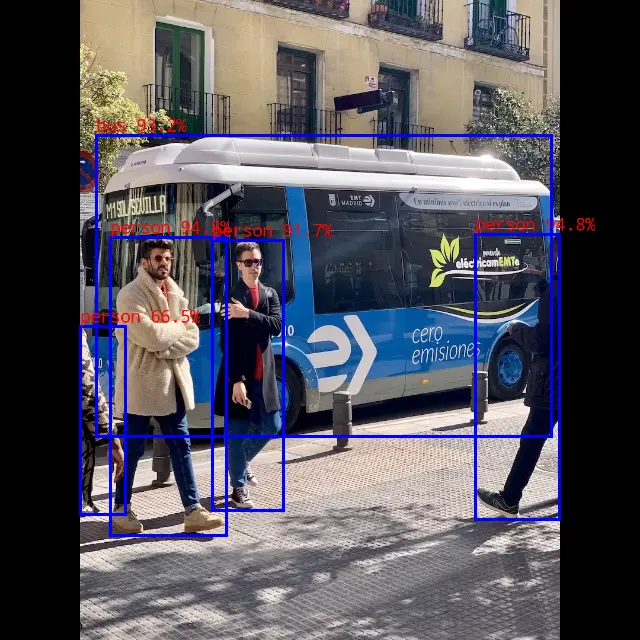
   person       0.948     [ 477,  232,  559,  521]
   person       0.932     [ 110,  236,  226,  536]
   person       0.917     [ 212,  240,  283,  510]
   person       0.595     [  80,  327,  126,  514]
    bus         0.917     [  98,  135,  553,  435]
Save results to result.jpg!
效果展示