MobileNet
环境配置
信息
参考 RKNN 安装 配置好相关环境。
参考 RKNN Model Zoo 下载示例文件。
模型下载
下载 onnx 模型文件。
X64 Linux PC
cd rknn_model_zoo/examples/mobilenet/model/
bash download_model.sh
模型转换
选择目标平台。
- rk3588
- rk356x
- rk3576
X64 Linux PC
export TARGET_PLATFORM=rk3588
X64 Linux PC
export TARGET_PLATFORM=rk356x
X64 Linux PC
export TARGET_PLATFORM=rk3576
将 onnx 模型转换为 rknn 模型。
提示
本示例可以在运行转换脚本之后看到模型输出。
X64 Linux PC
cd ../python/
python mobilenet.py --model ../model/mobilenetv2-12.onnx --target ${TARGET_PLATFORM}
模型输出:
-----TOP 5-----
[494] score=0.98 class="n03017168 chime, bell, gong"
[653] score=0.01 class="n03764736 milk can"
[469] score=0.00 class="n02939185 caldron, cauldron"
[505] score=0.00 class="n03063689 coffeepot"
[463] score=0.00 class="n02909870 bucket, pail"
C API
编译示例
切换到 rknn_model_zoo 目录下执行 build-linux.sh 编译脚本。
X64 Linux PC
cd ../../..
bash build-linux.sh -t ${TARGET_PLATFORM} -a aarch64 -d mobilenet
文件同步
然后将编译生成的 install 目录下的 demo 目录推送到板端。
X64 Linux PC
cd install/${TARGET_PLATFORM}_linux_aarch64/
scp -r rknn_mobilenet_demo/ user@your_device_ip:target_directory
运行示例
导出运行时库到环境变量。
Device
cd rknn_mobilenet_demo/
export LD_LIBRARY_PATH=./lib
运行示例。
Device
./rknn_mobilenet_demo ./model/mobilenet_v2.rknn ./model/bell.jpg
$ ./rknn_mobilenet_demo ./model/mobilenet_v2.rknn ./model/bell.jpg
num_lines=1001
model input num: 1, output num: 1
input tensors:
  index=0, name=input, n_dims=4, dims=[1, 224, 224, 3], n_elems=150528, size=150528, fmt=NHWC, type=INT8, qnt_type=AFFINE, zp=-14, scale=0.018658
output tensors:
  index=0, name=output, n_dims=2, dims=[1, 1000, 0, 0], n_elems=1000, size=1000, fmt=UNDEFINED, type=INT8, qnt_type=AFFINE, zp=-55, scale=0.141923
model is NHWC input fmt
model input height=224, width=224, channel=3
origin size=500x333 crop size=496x320
input image: 500 x 333, subsampling: 4:4:4, colorspace: YCbCr, orientation: 1
src width is not 4/16-aligned, convert image use cpu
finish
rknn_run
[494] score=0.993227 class=n03017168 chime, bell, gong
[469] score=0.002560 class=n02939185 caldron, cauldron
[747] score=0.000466 class=n04023962 punching bag, punch bag, punching ball, punchball
[792] score=0.000466 class=n04208210 shovel
[618] score=0.000405 class=n03633091 ladle
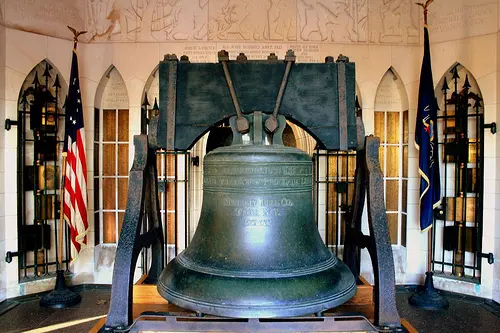
输出显示模型判断这是一张 bell, gong 的图片。
测试图片
Python API
本示例未提供单独的 Python API 运行脚本,读者可尝试自行实现。